Dashboard
RecurPixel.Notify Dashboard is an optional observability add-on for v0.3.0+. It automatically captures every send attempt — success and failure — and serves a filterable log UI and REST API from inside your ASP.NET Core app.
No separate service. No external storage API. No agents. You bring the database; we bring the UI and the write path.
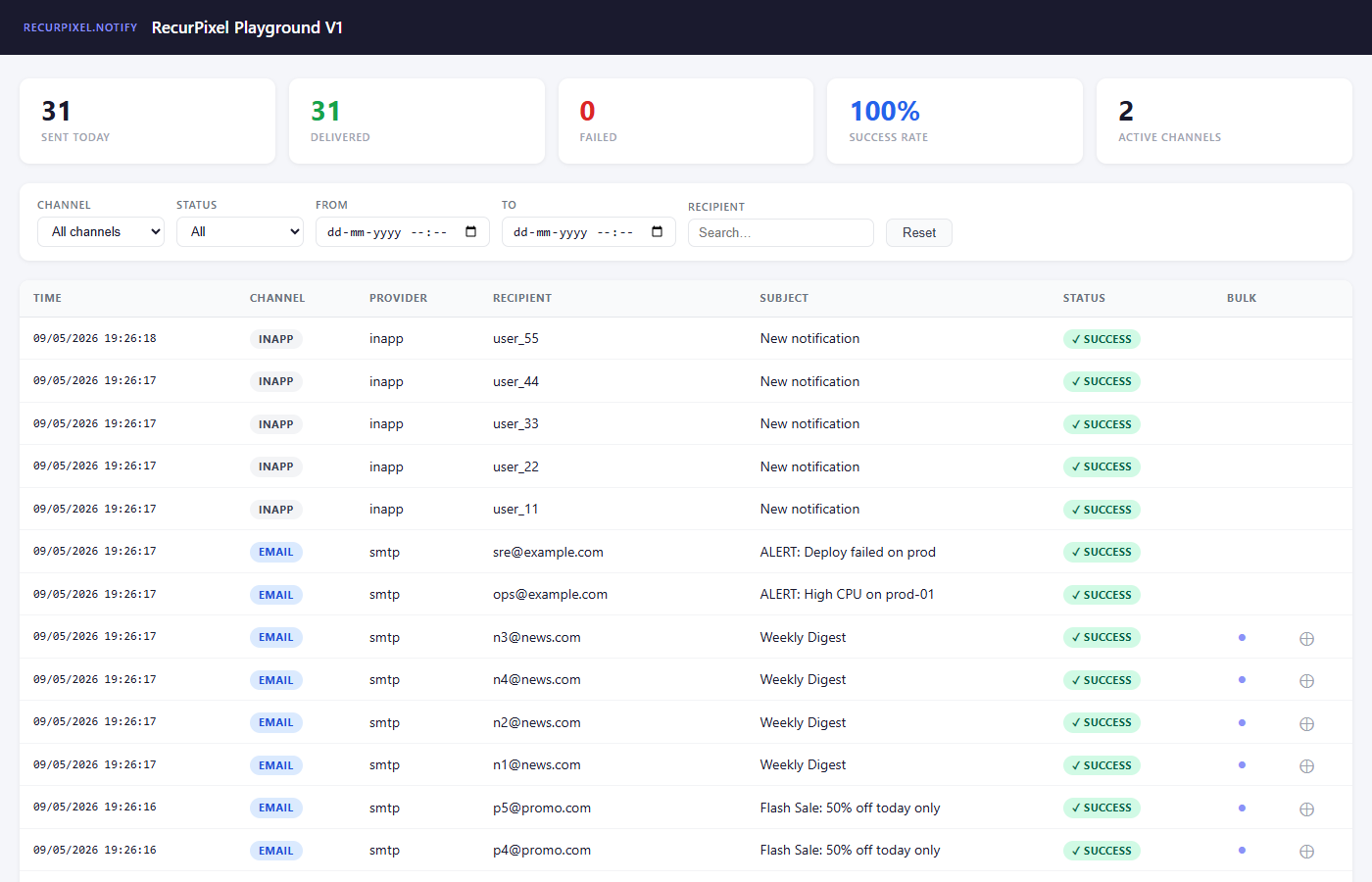
How It Works
TriggerAsync (or direct SendAsync)
    ↓
INotifyDeliveryObserver fires after each send
    ↓
DashboardDeliveryObserver writes NotificationLog
    ↓
INotificationLogStore persists the record
    ↓
Dashboard UI + REST API read from the same store
The observer is registered automatically when you call AddNotifyDashboard(). No changes to your existing AddRecurPixelNotify() call are required.
Install
dotnet add package RecurPixel.Notify.Dashboard
dotnet add package RecurPixel.Notify.Dashboard.EfCore
Dashboard.EfCore provides a ready-made DbContext and INotificationLogStore backed by any EF Core provider (SQL Server, PostgreSQL, SQLite). If you want to store logs in a different way, see Custom Store.
Setup
1 — Register the data layer
Two setup options. Pick the one that fits your project.
Option A — Standalone context (own connection string, own migration table, simplest to get started)
builder.Services.AddNotifyDashboard();

// SQL Server
builder.Services.AddNotifyDashboardEfCore(options =>
    options.UseSqlServer(builder.Configuration.GetConnectionString("NotifyDashboard")));

// PostgreSQL
builder.Services.AddNotifyDashboardEfCore(options =>
    options.UseNpgsql(builder.Configuration.GetConnectionString("NotifyDashboard")));

// SQLite (development / small deployments)
builder.Services.AddNotifyDashboardEfCore(options =>
    options.UseSqlite("Data Source=notify-dashboard.db"));
Then add the migration for the standalone context:
dotnet ef migrations add AddNotifyDashboard --context NotifyDashboardDbContext
dotnet ef database update --context NotifyDashboardDbContext
Option B — Plug into your existing DbContext (one DB, one migration run — recommended for most apps)
Your DbContext must call builder.AddNotifyDashboard() in OnModelCreating to add the NotificationLogs table to its model:
public class AppDbContext : DbContext
{
    public AppDbContext(DbContextOptions<AppDbContext> options) : base(options) { }

    protected override void OnModelCreating(ModelBuilder modelBuilder)
    {
        base.OnModelCreating(modelBuilder);
        modelBuilder.AddNotifyDashboard();  // adds NotificationLogs table + indexes
    }
}
Register your context and point the dashboard at it:
builder.Services.AddNotifyDashboard();
builder.Services.AddDbContext<AppDbContext>(options =>
    options.UseSqlServer(builder.Configuration.GetConnectionString("Default")));
builder.Services.AddNotifyDashboardEfCore<AppDbContext>();
Then add a migration to your existing context:
dotnet ef migrations add AddNotifyDashboard --context AppDbContext
dotnet ef database update --context AppDbContext
The NotificationLogs table is added alongside your own tables in the same database and migration history.
2 — Wire the middleware
app.UseNotifyDashboard();
Call this before app.MapControllers() or app.Run().
That’s all. The dashboard is now live at /notify-dashboard.
Minimal Program.cs Example
Option A — standalone context:
using RecurPixel.Notify;

var builder = WebApplication.CreateBuilder(args);

// ① Dashboard — standalone context
builder.Services.AddNotifyDashboard(opts =>
{
    opts.PageTitle   = "My App — Notifications";
    opts.RequireRole = "Admin";
    opts.PageSize    = 25;
});
builder.Services.AddNotifyDashboardEfCore(options =>
    options.UseSqlServer(builder.Configuration.GetConnectionString("NotifyDashboard")));

// ② Existing notify registration — no changes needed
builder.Services.AddRecurPixelNotify(
    notifyOptions => builder.Configuration.GetSection("Notify").Bind(notifyOptions),
    orchestratorOptions =>
    {
        orchestratorOptions.DefineEvent("order.confirmed", e => e
            .UseChannels("email", "sms")
            .WithRetry(maxAttempts: 3, delayMs: 500));
    });

var app = builder.Build();

// ③ Dashboard middleware
app.UseAuthentication();
app.UseAuthorization();
app.UseNotifyDashboard();

app.MapControllers();
app.Run();
Option B — plug into your existing DbContext:
using RecurPixel.Notify;

var builder = WebApplication.CreateBuilder(args);

// ① Dashboard — reuses your existing AppDbContext
//    (AppDbContext must call modelBuilder.AddNotifyDashboard() in OnModelCreating)
builder.Services.AddNotifyDashboard(opts =>
{
    opts.PageTitle   = "My App — Notifications";
    opts.RequireRole = "Admin";
});
builder.Services.AddDbContext<AppDbContext>(options =>
    options.UseSqlServer(builder.Configuration.GetConnectionString("Default")));
builder.Services.AddNotifyDashboardEfCore<AppDbContext>();

// ② Existing notify registration — no changes needed
builder.Services.AddRecurPixelNotify(
    notifyOptions => builder.Configuration.GetSection("Notify").Bind(notifyOptions),
    orchestratorOptions =>
    {
        orchestratorOptions.DefineEvent("order.confirmed", e => e
            .UseChannels("email", "sms")
            .WithRetry(maxAttempts: 3, delayMs: 500));
    });

var app = builder.Build();

// ③ Dashboard middleware
app.UseAuthentication();
app.UseAuthorization();
app.UseNotifyDashboard();

app.MapControllers();
app.Run();
Authentication
The dashboard is publicly accessible by default — a startup warning is logged in non-Development environments when no auth is configured.
Option A — Role-based (simplest):
builder.Services.AddNotifyDashboard(opts =>
{
    opts.RequireRole = "Admin";
});
The user must be authenticated and in the Admin role. Uses context.User.IsInRole() — works with ASP.NET Core Identity, JWT claims, or any claims-based auth.
Option B — Named policy (most flexible):
builder.Services.AddAuthorization(opts =>
{
    opts.AddPolicy("DashboardAccess", policy =>
        policy.RequireClaim("department", "engineering", "ops"));
});

builder.Services.AddNotifyDashboard(opts =>
{
    opts.PolicyName = "DashboardAccess";
});
PolicyName takes precedence over RequireRole when both are set.
Always secure the dashboard before deploying to production. It exposes recipient addresses and provider message IDs.
DashboardOptions Reference
| Property | Type | Default | Description |
|---|---|---|---|
RoutePrefix |
string |
"notify-dashboard" |
URL path prefix. Dashboard served at /<RoutePrefix>. No leading/trailing slash. |
PageTitle |
string |
"Notifications" |
Browser tab title for the dashboard page. |
RequireRole |
string? |
null |
ASP.NET Core role required to access the dashboard. |
PolicyName |
string? |
null |
Named authorization policy. Takes precedence over RequireRole. |
PageSize |
int |
50 |
Log entries shown per page in the dashboard table. |
REST API
All endpoints are served under /<RoutePrefix>/api/. The same auth rules as the dashboard UI apply.
GET /<prefix>/api/logs
Returns a paged, filtered list of notification log entries ordered by sentAt descending.
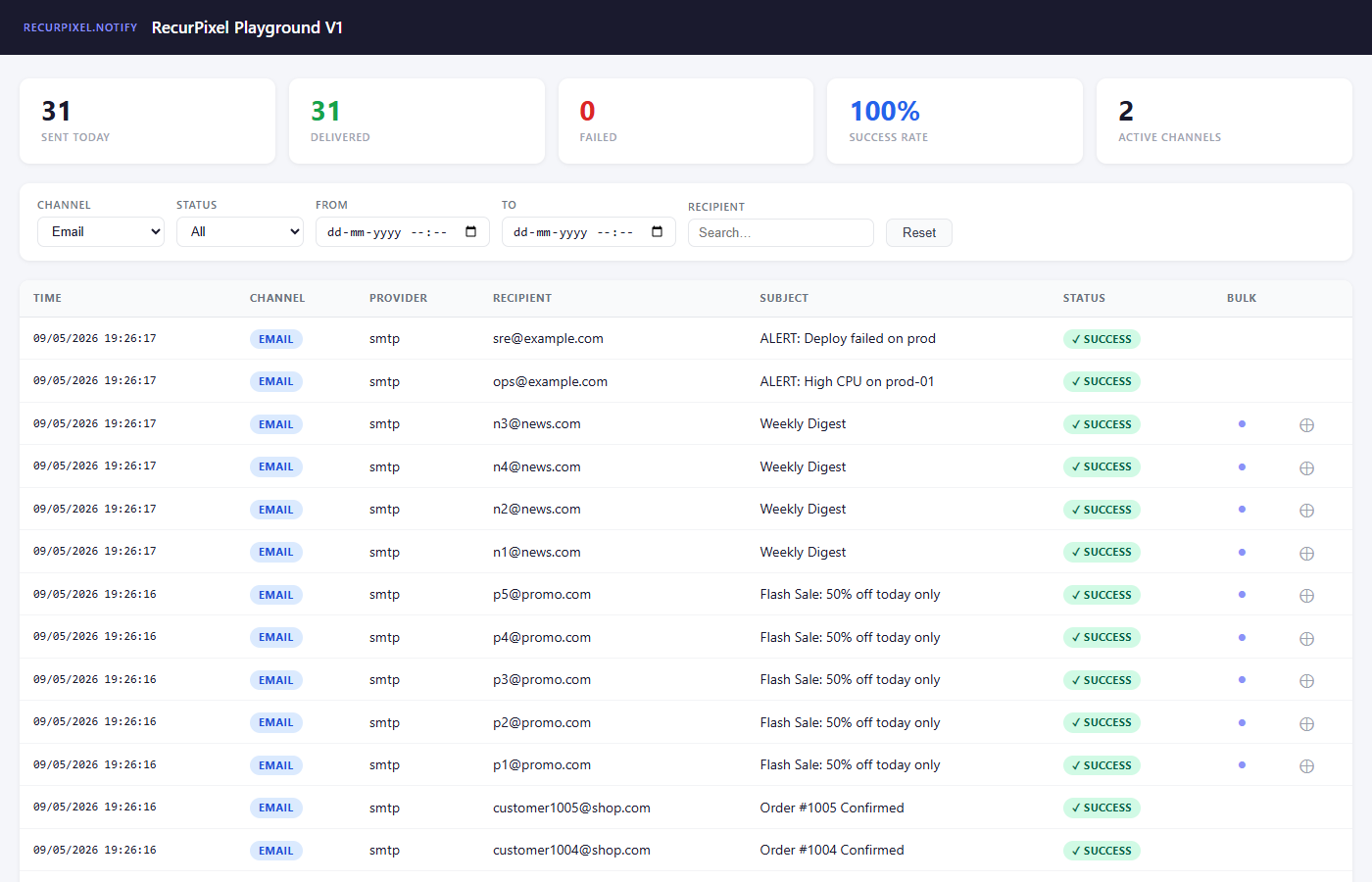
Query parameters:
| Parameter | Type | Description |
|---|---|---|
channel |
string |
Filter by channel name (e.g. email, sms, push) |
provider |
string |
Filter by provider name (e.g. sendgrid, twilio) |
status |
string |
success or failed. Omit for all. |
from |
string |
ISO 8601 UTC start date (e.g. 2026-04-01T00:00:00Z) |
to |
string |
ISO 8601 UTC end date |
recipient |
string |
Partial case-insensitive substring match on recipient |
eventName |
string |
Exact case-insensitive match on event name |
isBulk |
bool |
true = bulk only, false = single sends only |
page |
int |
1-based page number (default: 1) |
pageSize |
int |
Records per page (default: 50) |
Example:
GET /notify-dashboard/api/logs?channel=email&status=failed&page=1&pageSize=20
Response: JSON array of NotificationLog objects.
GET /<prefix>/api/logs/batch/{batchId}
Returns all log entries belonging to a single bulk send, ordered by sentAt.
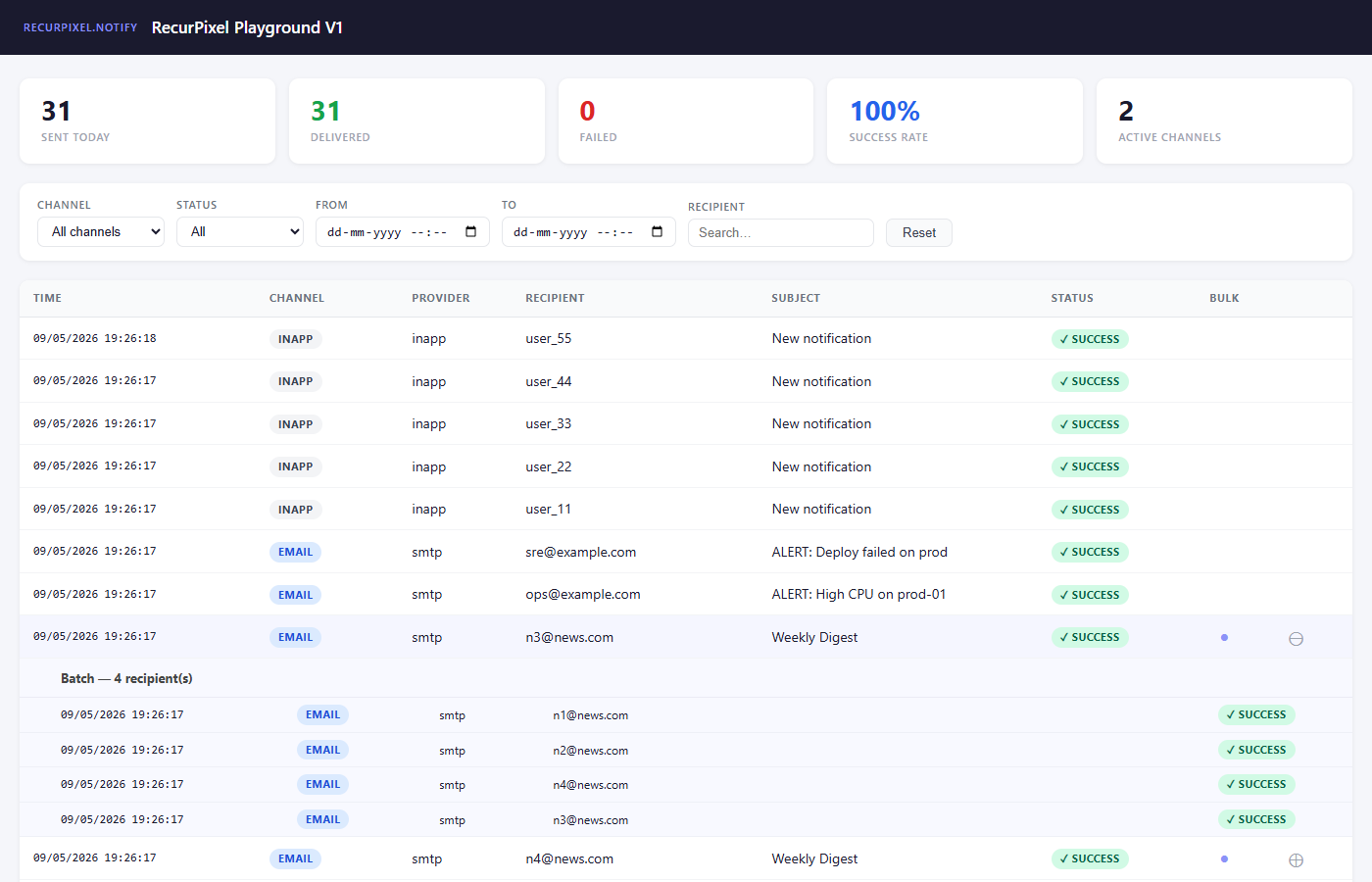
GET /notify-dashboard/api/logs/batch/bulk_20260423_a3f9c
Response: JSON array of NotificationLog objects sharing the given bulkBatchId.
GET /<prefix>/api/stats
Returns today’s summary statistics (UTC day boundary).
Response:
{
  "totalSent": 1240,
  "successCount": 1198,
  "failureCount": 42,
  "successRate": 96.6,
  "activeChannelCount": 3
}
| Field | Type | Description |
|---|---|---|
totalSent |
int |
Total send attempts today |
successCount |
int |
Successful sends |
failureCount |
int |
Failed sends |
successRate |
double |
Percentage (0–100), rounded to 1 decimal |
activeChannelCount |
int |
Distinct channels with at least one send today |
NotificationLog Entity
The NotificationLog entity is written after every send attempt. The FromResult factory maps NotifyResult directly.
| Field | Type | Description |
|---|---|---|
Id |
long |
Auto-incremented primary key |
Channel |
string |
Channel name (e.g. "email", "sms") |
Provider |
string |
Provider name (e.g. "sendgrid", "twilio") |
Recipient |
string |
Recipient identifier — email, phone, user ID, etc. |
Subject |
string? |
Notification subject (null for channels without a subject) |
EventName |
string? |
Event name from TriggerAsync. Null for direct channel sends. |
Success |
bool |
Whether the send was accepted by the provider |
ProviderId |
string? |
Provider’s own message ID for delivery tracking |
Error |
string? |
Error message when Success is false |
IsBulk |
bool |
True when this log belongs to a bulk send |
BulkBatchId |
string? |
Shared ID for all records in one BulkTriggerAsync call |
UsedFallback |
bool |
True when this send succeeded via a fallback channel |
NamedProvider |
string? |
Named provider used for routing (null = default provider) |
SentAt |
DateTime |
UTC timestamp of the send attempt |
Playground
The sample playground ships a Swagger UI at /swagger that wires up all notification endpoints — Welcome email, Order (parallel email + inapp), Bulk order, Critical alert with fallback, and InApp-only — against a local Mailpit SMTP server and a SQLite dashboard.
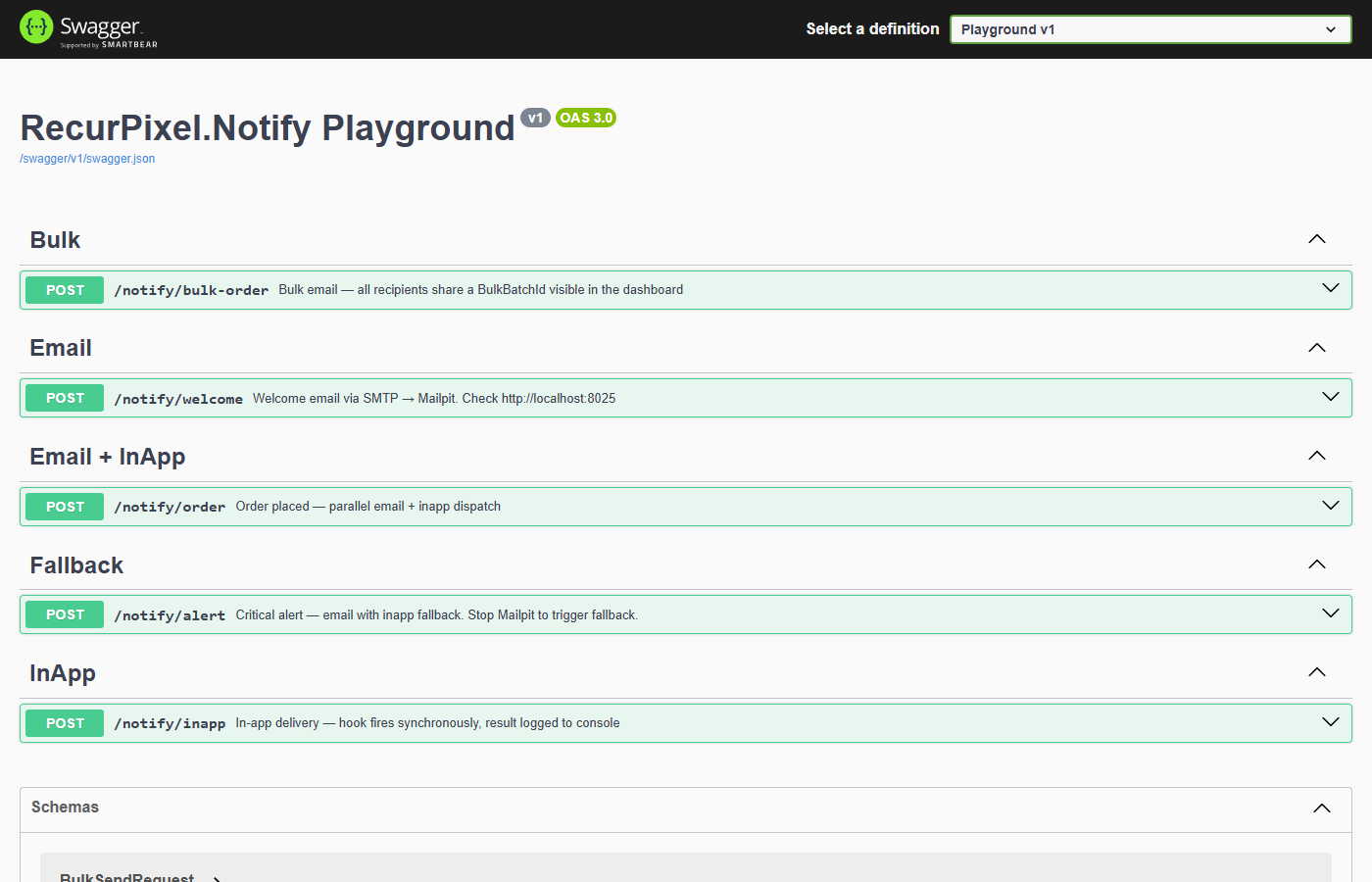
Start the playground:
docker compose up -d          # start Mailpit
dotnet run --project samples/RecurPixel.Notify.Playground
Then open:
- Dashboard:
http://localhost:5100/notify-dashboard - Swagger:
http://localhost:5100/swagger - Mailpit:
http://localhost:8025
Custom Store
To use a storage backend other than EF Core — Dapper, MongoDB, a third-party analytics service — implement INotificationLogStore and register it before calling AddNotifyDashboard():
public class DapperNotificationLogStore : INotificationLogStore
{
    private readonly IDbConnection _db;

    public DapperNotificationLogStore(IDbConnection db) => _db = db;

    public async Task AddAsync(NotificationLog log, CancellationToken ct = default)
    {
        await _db.ExecuteAsync(
            "INSERT INTO NotificationLogs (...) VALUES (...)", log);
    }

    public async Task<IReadOnlyList<NotificationLog>> QueryAsync(
        NotificationLogQuery query, CancellationToken ct = default)
    {
        // Build your filtered query
        var results = await _db.QueryAsync<NotificationLog>("SELECT ...");
        return results.ToList();
    }

    public async Task<IReadOnlyList<NotificationLog>> GetBatchAsync(
        string bulkBatchId, CancellationToken ct = default)
    {
        var results = await _db.QueryAsync<NotificationLog>(
            "SELECT * FROM NotificationLogs WHERE BulkBatchId = @id ORDER BY SentAt",
            new { id = bulkBatchId });
        return results.ToList();
    }

    public async Task<NotificationLogStats> GetTodayStatsAsync(
        CancellationToken ct = default)
    {
        // Query your store for today's UTC counts
        return new NotificationLogStats { /* ... */ };
    }
}
Register it:
builder.Services.AddScoped<INotificationLogStore, DapperNotificationLogStore>();
builder.Services.AddNotifyDashboard();
// Do NOT call AddNotifyDashboardEfCore — you're providing your own store
TryAddScoped in AddNotifyDashboardEfCore means any store registered before it wins.
Disabling Automatic Log Writes
If you want the dashboard UI and REST API without auto-capturing every send, don’t call AddNotifyDashboard() — just register the store and write to it manually from your OnDelivery hook:
// Don't call AddNotifyDashboard()
builder.Services.AddNotifyDashboardEfCore(options => options.UseSqlServer(...));

builder.Services.AddRecurPixelNotify(
    notifyOptions => { /* ... */ },
    orchestratorOptions =>
    {
        orchestratorOptions.OnDelivery<INotificationLogStore>(async (result, store) =>
        {
            // Write only what you want, when you want
            if (!result.Success)
                await store.AddAsync(NotificationLog.FromResult(result));
        });
    });

app.UseNotifyDashboard(); // UI and API still work — reads from the store you write to